


How to Sign a Document on iPhone & eSignature on iOS: Complete Guide in 2026 - EzSignly
April 28, 2026 | Posted By Admin
ESignature Software Tool
Summary
It will be effortless for users to sign documents on iPhones in 2026, since the
devices have built-in apps such as Markup and EzSignly to facilitate digital
signatures. One can access a file or document, insert his/her signature, and
position it perfectly in a few seconds. This means that signing becomes legal,
secure, and electronic. The sophisticated software allows multi-signing and
even integration with business workflows.
Table of Content:
1. Introduction
2. Why iPhone eSignatures Are Dominating in 2026
3. Step-by-Step: How to Sign a Document on iPhone
4. Beyond Basics: What Makes eSignatures Powerful on iOS
5. Legal Validity of eSignatures in 2026
6. Use Cases: Where iPhone eSignatures Excel
7. Why EzSignly Stands Out in 2026
8. Comparing Costs and Value
9. Security Considerations: What You Must Not Ignore
10. Common Mistakes to Avoid While Signing on iPhone
11. Conclusion
12.
FAQs
Introduction
Document signing processes have seen significant changes. The iPhone, in 2026, is not just a gadget used for communicating; it is now a fully functional system for executing documents. All iOS applications use e-signatures for contracts, HR onboardings, and other approvals.
This article will teach you how to sign a document using your iPhone, explore contemporary e-signature processes, and explain why our platform is making a difference.
🚀Unlock
90 days of free eSigning. Book a demo TODAY!!!
Why iPhone eSignatures Are Dominating in 2026
The shift towards mobile-first workflows is not incidental. Organisations now prioritise agility, remote accessibility, and compliance-ready processes. iPhones, combined with robust eSignature platforms, provide:
- Immediate document access and execution
- Reduced dependency on physical paperwork
- Legally valid and encrypted transactions
- Seamless integration with business ecosystems
For professionals and enterprises alike, adopting the best
eSign software solution of 2026 is no longer optional—it is operationally
essential. It directly enhances efficiency, ensures compliance, and accelerates
decision-making across critical business workflows.
Step-by-Step: How to Sign a Document on iPhone
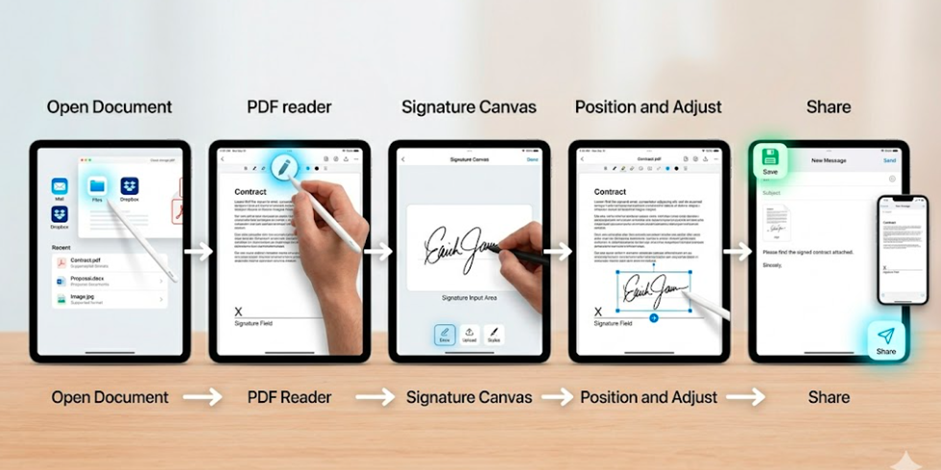
Signing a document on an iPhone can be completed within minutes using built-in iOS features or an advanced eSignature platform.
secure digital signing
This process forms the foundation of modern secure digital signing,
eliminating delays associated with manual methods.
Beyond Basics: What Makes eSignatures Powerful on iOS
While native tools are sufficient for simple tasks, advanced eSignature platforms offer significantly enhanced capabilities. They enable structured workflows, stronger security controls, and seamless collaboration across teams.
| Multi-Party Signing | Send documents to multiple stakeholders and track completion in real time. |
| Audit Trails | Maintain a digital record of every action taken on a document, ensuring transparency and compliance. |
| Workflow Automation | Automate approvals, reminders, and document routing for efficiency. |
These capabilities are particularly valuable for eSign
business environments where speed and accountability are critical.
Legal Validity of eSignatures in 2026
A common concern remains legality. In 2026, eSignatures are widely recognised under various legal frameworks, provided they meet key criteria:
- Intent to sign
- Consent to conduct business electronically
- Secure identity verification
- Tamper-evident document integrity
For organisations operating in India, adopting an eSignature
tool for legal documents in India ensures compliance with local regulations
while maintaining global standards.
Use Cases: Where iPhone eSignatures Excel
As organisations increasingly adopt mobile-first operations, the practical applications of iPhone eSignatures continue to expand across industries. From internal processes to client-facing transactions, their versatility supports both speed and compliance. Understanding these real-world applications highlights where digital signing delivers the most tangible value.
👉HR and Employee Onboarding - Recruitment and onboarding processes are significantly faster with digital signing. Platforms offering e-signature features for HR onboarding in India streamline document collection, verification, and approvals.
👉Legal Documentation - Contracts, NDAs, and agreements can be executed instantly, reducing turnaround time and administrative overhead.
👉Sales and Client Agreements- Sales teams can close deals faster by sending documents directly to clients for immediate signing.
👉Personal
Documentation – From rental agreements to consent forms,
individuals benefit from the convenience of mobile signing.
Why EzSignly Stands Out in 2026
This platform has positioned itself as a comprehensive eSignature solution designed for modern users. Its ecosystem supports individuals, startups, and enterprises with equal efficiency.
Key advantages are like:
- Intuitive mobile-first interface
- Enterprise-grade encryption and compliance
- Scalable solutions for growing businesses
- Seamless integration with existing workflows
Its flexible eSignature plans for personal and
business use make it accessible without compromising on advanced
functionality.
Comparing Costs and Value
Cost considerations remain central to adoption decisions. However, evaluating eSignature solutions should go beyond pricing alone.
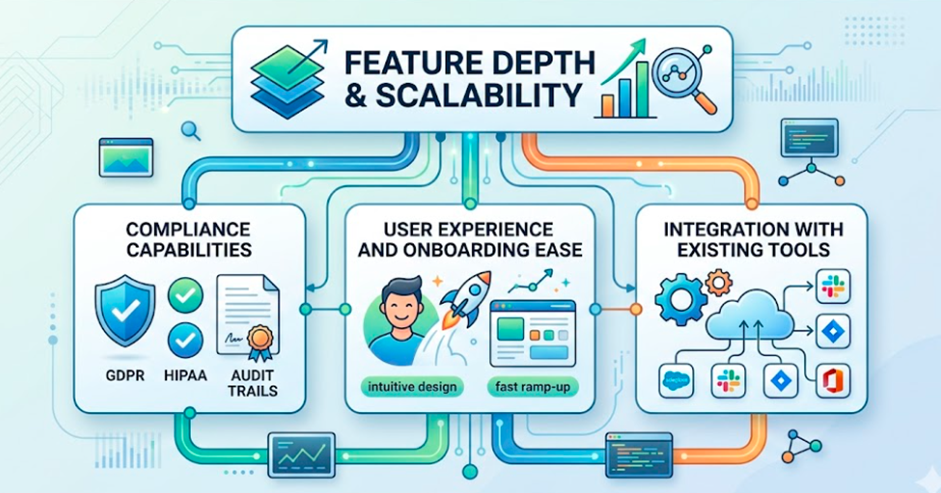
When reviewing an e-sign price comparison PDF, organisations should assess:
Esignature Software Solution
Our software balances affordability with robust
functionality, making it a practical choice for cost-conscious yet
growth-orientated organisations.
Security Considerations: What You Must Not Ignore
Security is fundamental to digital signing. A reliable eSignature platform must include the following. Also, it should ensure continuous monitoring and compliance updates to address evolving cybersecurity threats and regulatory requirements.
- End-to-end encryption
- Multi-factor authentication
- Tamper-proof document sealing
- Role-based access controls
Without these safeguards, digital convenience can
become a liability. This software prioritises these elements to ensure trust
and reliability in every transaction.
Have any other questions? EzSignly's team is here to help!
Common Mistakes to Avoid While Signing on iPhone
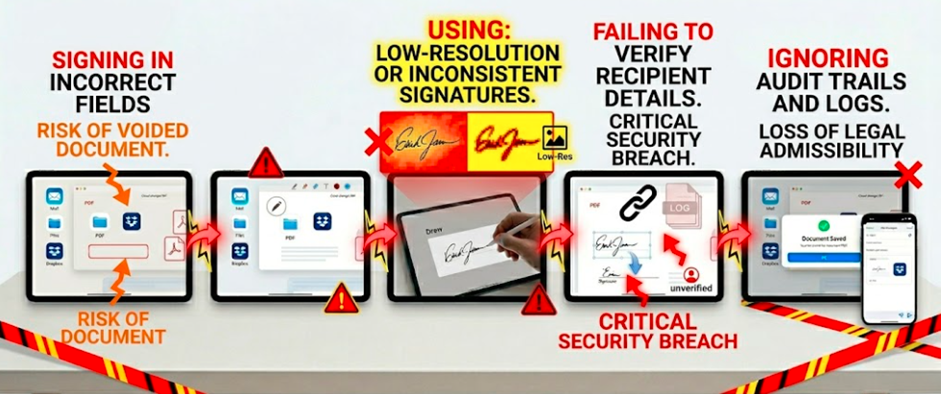
Even with intuitive tools, users often encounter avoidable issues. When using eSignature Plans for Personal & Business, it is essential to sign in the correct fields and maintain high-resolution, consistent signatures for a professional appearance. Overlooking recipient verification can result in serious security vulnerabilities and potential data breaches.
Electronic Signature Tool
A structured workflow mitigates these risks and
ensures professional outcomes. By establishing clear protocols and checkpoints,
teams can minimise human error while maximising overall efficiency. This
systematic approach ultimately builds stakeholder trust, ensuring that
deliverables consistently meet the highest standards of quality.
Conclusion
Signing documents on an iPhone in 2026 is not merely convenient—it is strategically advantageous. With the right tools, users can execute legally binding agreements within minutes, regardless of location.
If you are still printing, signing, scanning, and emailing documents in a loop, it is worth reconsidering your approach. We offer a streamlined, secure, and scalable solution designed for contemporary demands.
👍
Avail our 90-day free trial and see the difference.
FAQs
1. Can eSignatures on iPhone be revoked after sending?
Yes, in controlled workflows. Advanced platforms allow document recall or access restriction before the recipient completes signing.
2. Do eSignatures work offline on iOS devices?
Certain apps allow offline signing, but synchronisation and audit trails are updated only when the device reconnects to the internet.
3. Is there a difference between drawing and uploading a signature?
Functionally, both are valid. However, uploading a consistent, high-quality signature often appears more professional in formal documents.
Take a look at the latest blog
Bulk Send & Signing Feature for Fast Business Growth: Use eSignature Tool for Free
Use Bulk Send & Signing to expedite your business. Track progress, send documents to several destinations, and obtain eSignatures more quickly—all fro...
July 30, 2026
Top Reasons to Adopt Electronic Signatures in Your Company – Start Your Free Trial
Boost speed, security, and productivity with electronic signatures. Switch to EzSignly and simplify signing workflows. Start your free trial today.
April 20, 2026
Free vs Paid HR eSignature Software: Get Complete Insights for Your Business: Signup Now
To choose which HR eSignature software is ideal for your company, compare free and premium options. To receive comprehensive insights, register now.
July 24, 2026
Go digital with EzSignly: Stop wasting money on slow signature processes.
Go digital with EzSignly and eliminate delays caused by manual signatures. Save time, reduce costs, and streamline your workflow with fast, secure e-s...
April 6, 2026
Have any other questions? EzSignly's team is here to help!
© 2026 Copyright EzSignly. All Rights Reserved