


How Much Does Online PDF Signing Really Cost? Detailed Comparison of Free Vs Paid Tool
September 16, 2026 | Posted By Admin
eSignature Pricing Online
Summary
Free PDF signing apps look appealing until you hit a
wall of locked features and monthly caps. Here on the blog, we analyze free and
paid ways to make it crystal clear what you should expect, why, and how you
should spend it. We break down cost structures, hidden costs and leave you with
a basic checklist to choose between packages, ready to decide how your budget
lines up with the authorization that you actually need.
Introduction
Weekly, thousands of small businesses, freelancers,
and human resources employees nationally open a document, have it signed, and
are confident this is an easy-to-do, fee-free task. This is often not the case.
Often a paywall follows your 3rd document upload, or a template will only
become accessible by paying more, or an account charges more than what was
advertised at registration. You may be searching to figure out digital
sign pdf pricing in Illinois, or elsewhere nation-wide - an the prices vary
drastically from one competitor to the next. Time and money are wasted as the
buyer tries to figure out the cost difference. We are here to clarify what you
can actually do for free, and what to consider when buying services worth their
weight in gold. Our article is a practical reference manual, not a selling
manual.
Why Free Signing Apps Rarely Stay That Way
Nearly all free products have been built not for the
long run success of your company but to hook you to spend real money. At best,
it works out at 3 to 5 documents each month, gives you no audit trail, and has
no support for sending documents out to multiple people. Some also watermark
your files or restrict you to a long-term template. If you're a student and
need to spend one lease, no problem. If you have 10 tenants, a contractor
closing sales deals on a weekly basis or an HR manager bringing on new hires
every week, these restrictions will begin to become an everyday frustration.
The second you start needing to bulk send, have custom branding, and follow up
on unfinished leases, those free limitations will ultimately force you towards
a subscription plan.
What Premium Packages Actually Include
Depending on your usage volume, your storage needs, and the amount of other business software you want it to communicate with, the price of subscription brackets range from $10 to $40 per user monthly starting around the bottom. At minimum, you should be prepared for unlimited electronic document sends, in-document usage logs, and mobile capabilities.
For packages at the median level, you will gain group management, branded electronic documents, and opportunities for syncing with existing Human Resources and/or Sales management applications. Enterprise brackets bring advanced authentication, bulk sending, and dedicated support. Also keep an eye on any vendors that offer additional help, like onboarding calls or webinars, with their higher-tier packages.
Getting the larger team set up can still be tricky for
the individual, so this can make it a bit quicker. A reliable electronic
authorization platform should also offer a legally valid binding
eSignature that holds up in court, since that's the entire point of
putting your signature on anything in the first place.
Free vs Paid: A Side-by-Side Price Comparison
| Features | Free option | Premium Option |
| Monthly document limit | 3-5 | Unlimited |
| Compliance Trail | Basic or none | Full, timestamped |
| Customer Branding | Not available | Included |
| Multi-party routing | Limited | Included |
| Support | Community forums | Priority email or chat |
This table shows the gap isn't just about volume. It's
about reliability, compliance, and the hours saved each week.
Hidden Costs to Watch For Before You Commit
A low sticker rate doesn't always mean low expense. Keep in mind the per-envelope fees, which can add up if you need to send out dozens of contracts every month. With other vendors, there are also separate fees for templates, extra users, or more storage space. Others lock advanced authentication, such as ID verification, behind an add-on upgrade.
Before subscribing, ask for a full feature list tied to each bracket, not just a marketing page. Instead of sneaking additional fees into your subscription that you uncover after paying, an open vendor will detail every unexpected line item and provide clear reasoning.
A few other vendors will provide discounts of up to
10–20% on annual plans versus paying every month. If you don't think you'll
change providers again for a few years, then the annual payment could save you
some money. Be sure to check with your provider first about their refunds on
annual plans.
A Simple Checklist for Choosing the Right Package
This checklist will help you decide if the subscription you are looking at is worth it.
- Count how many contracts or forms you actually send each month
- Check whether compliance trails and timestamps come standard at your bracket
- Confirm the platform offers digital signing software that meets state compliance standards
- Ask if integrations with your existing apps are included or billed separately
- Test the mobile experience if your team signs on the go
- Compare cancellation terms and whether you can downgrade mid-cycle
- Read reviews from businesses your size, not just enterprise case studies
Taking fifteen minutes out to check every single one
of these will save you at least several hundred pounds every year.
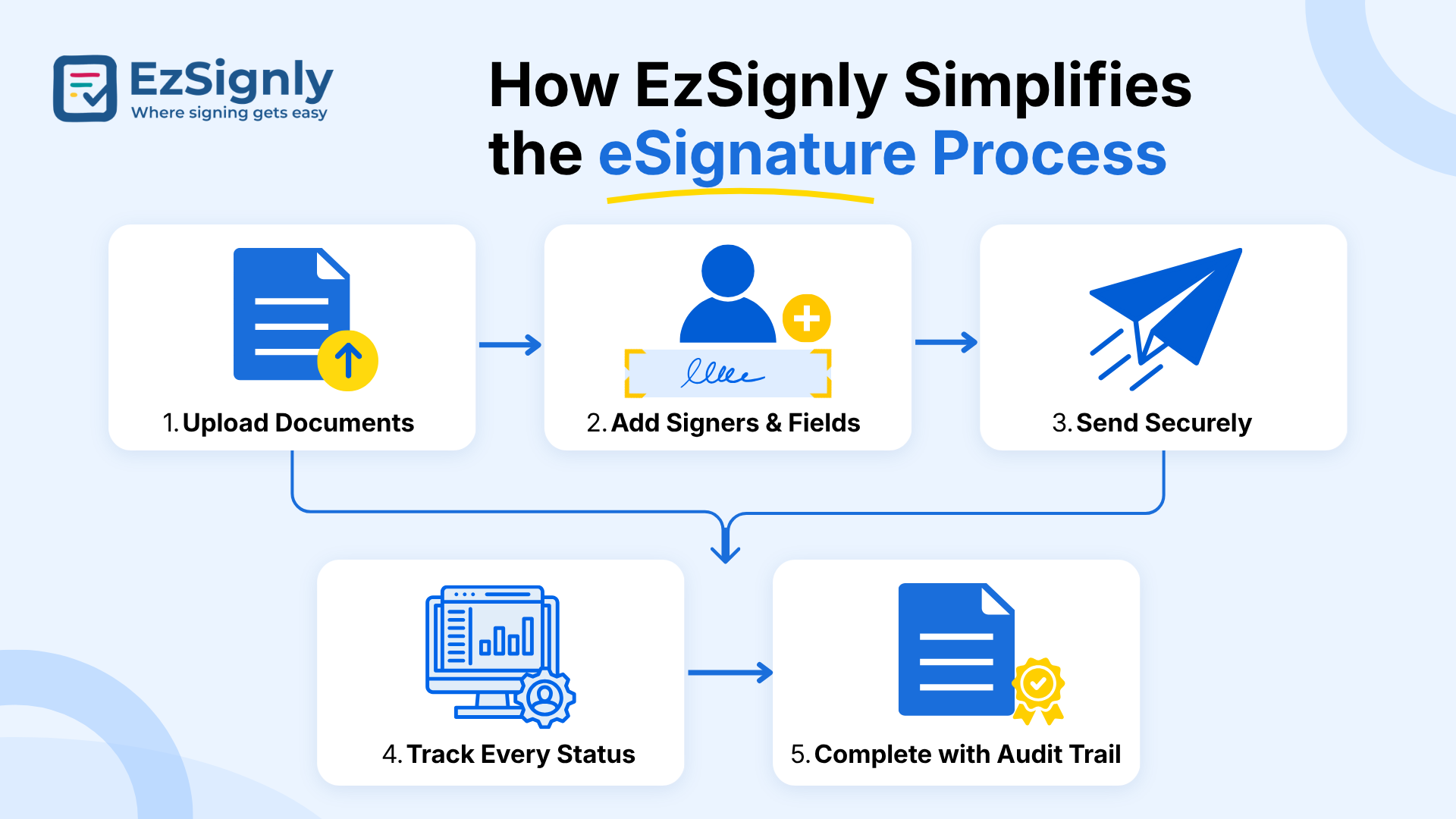
How EzSignly Simplifies the eSignature Process
For businesses trying to balance expense against reliability, EzSignly offers a middle path worth considering. Instead of artificially encouraging users to select the higher plan, the payment structure grows along with your actual usage, so a small-time landlord or individual freelancer doesn't need to overpay the enterprise package fees for capabilities you will likely never use.
As well as audit trails, multi-party routing, and
mobile workflows at prices closer to the cheap end of the market, without the
caps on documents that render most free platforms useless beyond that. As
a paperless signing software in Illinois that businesses can
lean on for everyday use, its support desk also responds quickly to setup
questions, which matters most during the first few weeks of use. For readers
comparing options in this guide, it's a useful reference point for what a fairly
priced, compliant platform can look like.
Electronic Signing Software
Industry-Specific Rate Considerations
Expenses shift depending on your sector. Real estate agents closing more than a handful of contracts every week need an endless supply of sends and rapid turnaround time, so going mid-tier likely covers its cost in a single month. For legal use cases, a robust audit trail and years-long document retention often warrant a plan at the higher end of the spectrum. An eSignature software for HR in Chicago probably has features like bulk onboarding, template databases for offer letter creation, and payroll integration; human resources needs are frequently nudging you toward mid- and enterprise - tier plans.
Meanwhile, nonprofits and freelancers might need very
few —if any— bells and whistles, and can get by with something thin to support
small, intermittent needs. Matching your plan to your industry's actual
workflow, rather than a generic "popular" tier, keeps spending
sensible.
Steps to Switch Providers Without Losing Momentum
Is your current app no longer suitable for your pocket? Need more from your current setup? Take the leap without fear. Start by exporting existing templates and signed records for your files. Finally, pilot your best two platforms with an actual filing, not just mock docs.
Choose just one of your teams or departments to pilot
the company-wide migration, give them a brief session of about an hour on the
new interface to train them, commit to 2 to 4 weeks for the new platform to
kick off and run smoothly for everything, and finally make sure to back up an
export of all signed documents just in case. Don't cancel your other
subscription until you've actually used your new platform for your week of
highest traffic and it works just fine.
Conclusion
Signing app prices vary, and the cheapest app now can be the priciest later on. In my view, there is no real bargain beyond signing a few free forms now and then. Professional use does require premium pricing for speed, compliance, and efficiency, but all pricing plans are dependent on sending habits, industries, and desired progress.
Choose wisely, based on the size of your sending
traffic and business goals; don't rely on a pricing comparison sheet to select
your application. It's better to evaluate the signing platform ourselves to
know whether or not you will find success. Test your signing platform out for
free to try it out yourself.
Have any other questions? EzSignly's team is here to help!
FAQs
Q: Is there truly a complimentary option for handling document authorization online?
A: Yes, most providers offer a no-charge tier, but it typically limits you to a handful of sends every cycle and skips capabilities like activity logs or custom branding. It suits occasional personal use rather than regular business needs.
Q: How much should a small business expect to spend on an eSignature tool each cycle?
A: Most small teams land between $10 and $30 per user each cycle for a solid mid-level subscription. Expenses climb from there based on usage, storage, and extra authentication options.
Q: Do eSignature providers bill per document or per user?
A: It depends on the vendor. Some charge per user with unlimited sends bundled in, while others bill per envelope or per signed file, which adds up quickly for high-volume senders. Always confirm which billing model a provider uses before committing.
Take a look at the latest blog
Adobe vs EzSignly: The Ultimate Bulk eSignature Workflow Comparison for Businesses: Book a Demo
Compare Adobe and EzSignly for bulk eSignature workflows. See which solution streamlines document signing, automation, and team productivity. Book a d...
June 16, 2026
Why E-Signatures Are Essential for Business Digital Innovation
E-signatures enable faster, paperless approvals and support secure, efficient digital business processes.
January 27, 2026
A Free Solution to all your PDF e-Sign Problems
EzSignly lets you e-sign PDFs online quickly, securely, and for free.
January 27, 2026
eSignature Pricing Per User vs Per Document: What Should Businesses Pay? : Signup Now
Compare eSignature pricing per user vs. per document to find the most cost-effective option for your business. Understand pricing models, hidden costs...
September 4, 2026
Have any other questions? EzSignly's team is here to help!
© 2026 Copyright EzSignly. All Rights Reserved