


Top eSignature Security & Automation Features Driving Business Growth- 90 Days Free Trial
April 15, 2026 | Posted By Admin
Best Esignature Software Tool
Summary
Most businesses still waste hours on manual signing,
follow-ups, and chasing approvals. This blog walks through the security
features and automation capabilities that make modern e-signature tools
genuinely useful, not just digital versions of paper. If you are evaluating
options in 2025, here is what actually matters.
Table of Contents
- Introduction: Signing a document should not take three days
- The real problem with manual document workflows
- Security features that actually matter
- Automation features that save real time
- Features to look for in 2025
- Who benefits most from these features
- A quick note on pricing and value
- Conclusion
- Frequently
asked questions
Introduction: Signing a document should not take three days
Think about the last time you sent a contract out for signature. Did you print it? Email a PDF and wait? Call someone to remind them? For most teams, the signing process is slow, manual, and full of back-and-forth that adds zero value.
The good news is that the tools to fix this already exist and they are affordable. The better news is that a trusted e-signature tool for business does not just replace ink. It automates the entire workflow around a document, keeps your data secure, and gives you visibility.
This blog breaks down the features that actually drive business growth, so you can skip the sales pitches and evaluate what matters. Whether you are a legal team, an HR manager, or a business owner in the US, this is written for you.
Try all features free for 90 days. No credit card needed.
1. The real problem with manual document workflows
Before getting into features, it helps to understand what you are replacing.
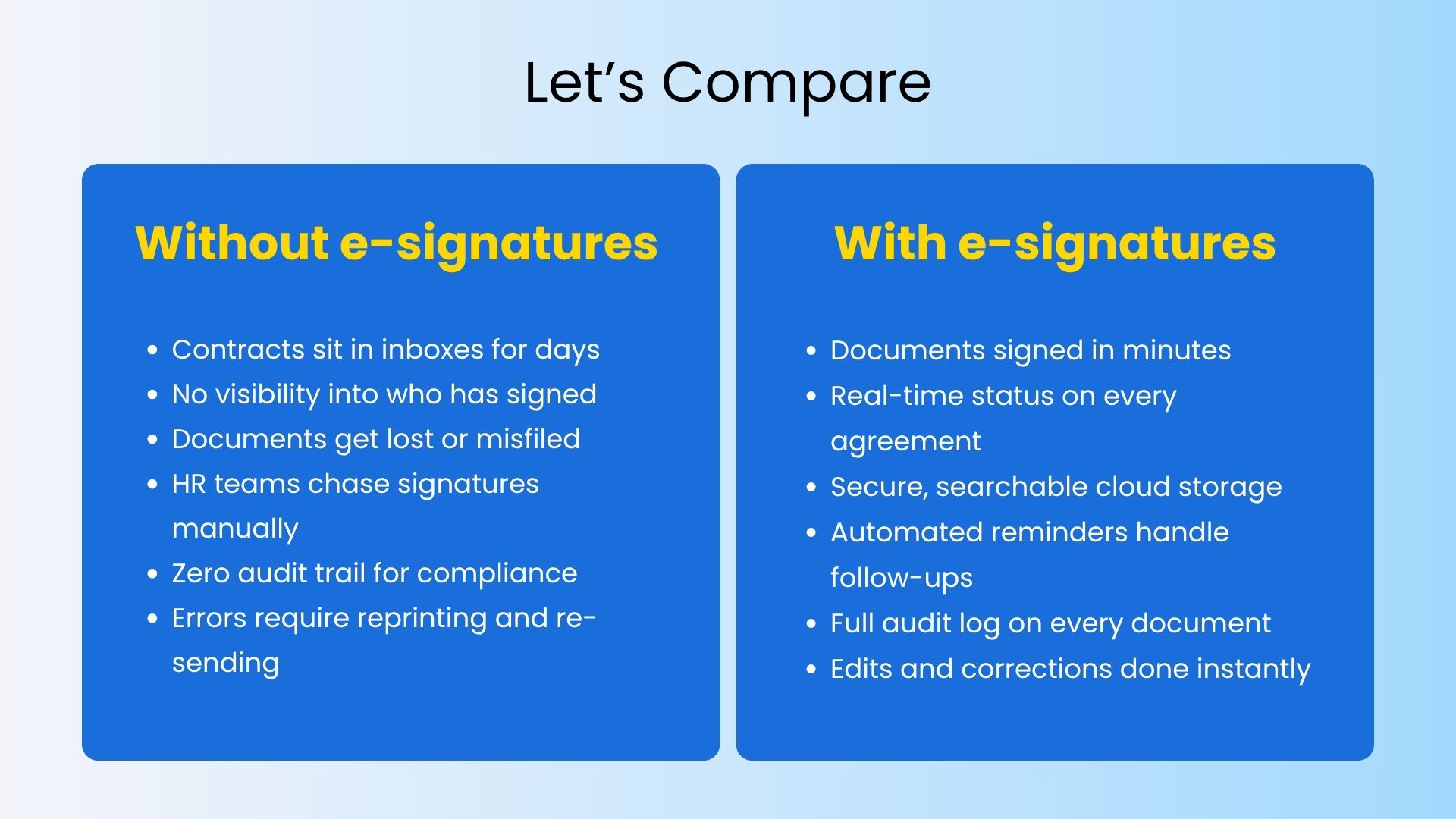
Esignature Software
The gap is significant. And for teams handling high
volumes of contracts, NDAs, HR paperwork, or vendor agreements, that gap shows
up directly in revenue cycles and employee experience.
2. Security features that actually matter
Security is where most buying decisions get made, and rightly so. When documents carry sensitive business, legal, or employee data, the platform you trust needs to meet a real standard, not just check boxes.
Here is what solid eSignature security in digital transactions looks like in practice.
Tamper-evident audit trails
Every signed document should carry a complete log of who opened it, when it was signed, from which device and IP address, and what version was signed. This is what makes secure electronic signature technology defensible in court and during audits.
End-to-end encryption
Your documents should be encrypted both in transit and at rest. Look for AES-256 encryption as a baseline. This is the same standard used by banks. Anything less is not acceptable for business-grade use. Secure file transfer with electronic signature capability means your documents are protected at every point in the journey, not just when they are sitting in storage.
Multi-factor authentication
A signer should be who they say they are. Multi-factor authentication adds a second layer of verification, typically via SMS or email, before a document can be signed. For higher-risk agreements, some platforms also offer ID verification and biometric checks.
Compliance with US and global standards
For teams operating across the country, electronic signature security compliance is non-negotiable. Look for platforms that are ESIGN Act and UETA compliant in the US, and that support SOC 2 Type II, ISO 27001, and GDPR where relevant. For businesses in Illinois specifically, using a legal e-signature solution in Illinois that meets state-level requirements adds an important layer of legal protection.
Role-based access controls
Not everyone on your team should have access to every
document. Good platforms let you control who can view, edit, send, or sign at a
granular level. This matters a lot for legal teams, finance departments, and
HR, where document confidentiality is critical.
3. Automation features that save real time
Security is the foundation. Automation is where you start to see business growth. Here is what workflow automation with e-signatures looks like when it is done well.
Automated signing order and routing
Set up a document once and define who signs in what order. The platform handles the rest. When the first signer completes their step, the document automatically moves to the next person. No manual forwarding, no follow-up calls. This alone saves hours per week for teams dealing with multi-party agreements.
Automated reminders and expiry
Most delays happen because someone forgot to open their email. Automated reminders send follow-ups at intervals you define, without you having to do anything. You can also set expiry dates on documents so agreements do not sit unsigned for weeks without a nudge.
Templates for high-frequency documents
If you send the same NDA, offer letter, or vendor agreement repeatedly, templates save significant time. Build the document once, set the fields, and send in seconds. HR managers using HR online signature software in Illinois have cut new hire paperwork time from days to under an hour using template-based workflows.
Bulk send
Need the same document signed by 200 employees or 50 vendors? Bulk send lets you distribute a document to a large group simultaneously, with individual tracking for each recipient. Each person gets their own signing experience and their own audit trail.
AI document management
This is where newer platforms are pulling ahead. An AI
contract management tool can automatically extract key clauses, flag
missing fields, suggest completion dates, and surface potential risks before a
document goes out.
4. Features to look for in 2025
The e-signature market has matured a lot. Here are the specific capabilities that separate good platforms from great ones this year.
Remote online notary (RON) support
For legal documents that require notarization, some platforms now offer built-in esignature tools remote online notary services 2025 capabilities. This lets signers complete notarized documents entirely online, without a physical appointment. Any platform worth evaluating should let you test it properly. A free esignature tool trial that limits core features is not a real trial.
Mobile signing
A growing share of documents get signed on phones. Your platform needs to work as well on a mobile screen as it does on a desktop. This includes a clean signing experience for external parties who may not be tech-savvy.
Multi-Account Access
Eliminate login fatigue with our Master Hub. Access
and manage multiple subsidiaries through one secure login, seamlessly switching
between entities to maintain total oversight of your document workflows across
your empire.
5. Who benefits most from these features
These are not abstract capabilities. Here is how they apply to specific teams.
Legal teams
Faster contract turnaround, court-admissible audit trails, and multi-party signing workflows reduce the operational load. For firms and in-house teams operating in Illinois, a legal e-signature solution that adheres to state-specific compliance is a must, given their local obligations.
HR Processes
HR departments, in particular, can benefit. Offer letters, employment agreements, and policy acknowledgments can all be dispatched, signed, and securely stored with ease. Electronic signature software streamlines HR processes, transforming what once took days into a matter of minutes.
Sales teams
They face a common problem: unsigned proposals and agreements mean lost revenue. Automated reminders, real-time tracking, and the ability to sign on mobile devices accelerate the process, providing sales managers with a clear view of each deal's status.
Finance and procurement departments
They also gain from automation and a clear audit trail. For finance teams, secure file transfer combined with electronic signature capabilities ensures the protection of sensitive financial documents throughout the entire process.
See every feature in action.
→ Full access, no restrictions, for 90
days. Get E-Signature at the Best Price
Have any other questions? EzSignly's team is here to help!
6. A quick note on pricing and value
Price is almost always part of the conversation, and it should be. The good news is that strong eSignature detailed features do not have to come at enterprise prices. Many platforms offer tiered plans that scale with your usage, and a genuine free trial period lets you validate ROI before spending anything. When evaluating cost, look beyond the per-seat price. The math usually makes the decision straightforward.
EzSignly, for example, is built to give growing
businesses access to enterprise-grade security and automation without the
enterprise price tag. The 90-day free trial gives your team enough time to test
it across real workflows, not just demos.
Conclusion
The best e-signature platforms in 2025 are not just tools for collecting signatures.They are workflow engines that handle routing, reminders, compliance, and document storage automatically, while keeping every transaction secure. Whether your priority is eSignature security in digital transactions, cutting down contract cycle time, or scaling your HR onboarding process, the features covered here are the ones that move the needle.
And with platforms like EzSignly offering a full 3-months free trial, there is no reason to wait to find out what the right setup looks like for your team.
Start your 90-day free trial today. No
credit card, no commitment.
Frequently asked questions
Q1: Are e-signatures legally valid across all US states?
Ans: Yes. The federal ESIGN Act (2000) and the Uniform Electronic Transactions Act (UETA), which has been adopted by 49 states, make e-signatures legally valid for the vast majority of business and personal contracts across the US. Certain document types like wills and adoption papers may still require wet ink in some states.
Q2: How is an e-signature more secure than a handwritten one?
Ans: A handwritten signature carries no metadata. An electronic signature, by contrast, comes with a full audit trail including the signer's identity, timestamp, device information, and IP address.
Q3: What should you consider when evaluating a free e-signature trial?
Ans: Look for a trial that gives you complete access to key features, including templates, the ability to send documents in bulk, audit trails, automated reminders, and integrations. A trial that limits these features won't give you a complete picture of how the platform will work in your real-world processes.
Take a look at the latest blog
Affordable vs Enterprise eSignature Plans: Choose the Right Solution
Affordable eSignature plans offer basic, low-cost signing tools for small businesses, while enterprise plans provide advanced features for large organ...
March 9, 2026
Transforming Digital Workflows into Growth Opportunities with eSignatures
Empower your business to move faster and smarter by integrating eSignatures into your workflows, improving speed, security, and scalability.
February 24, 2026
From Ink to Click: How eSignatures Are Transforming Business Workflows in 2026
E-Signatures are transforming business in 2026 by reducing delays, cutting costs, and enabling instant digital approvals.
February 2, 2026
Cost-Effective eSignature Platforms for Small Businesses in USA & India
Affordable eSignature platforms help small businesses in the USA and INDIA sign and manage documents online quickly, securely, and without paperwork.
March 24, 2026
Have any other questions? EzSignly's team is here to help!
© 2026 Copyright EzSignly. All Rights Reserved