


Step-by-Step Guide to Sending HR Documents for E-Signature with EzSignly
February 17, 2026 | Posted By Admin
E-Signatures For HR Documents
HR work in 2026 is no longer bound by geographical limitations. The world is one global village, connected by high-speed internet highways. Teams hire across cities. Hence, more businesses are adopting HR online signature software in Illinois for fast onboarding, clean documentation, and secure execution. Candidates review offers from their phones. Employees work hybrid. And HR departments are expected to move quickly without compromising compliance or professionalism.
This guide explains how HR teams can eSign documents
online with EzSignly, which HR paperwork is best suited for digital signing,
and how to ensure the workflow remains secure and legally sound.
Why HR Teams Are Moving to Digital Signing in 2026
The biggest change in HR over the last few years is expectations.
Potential hires want things to go smoothly; hiring managers want their new hires to be onboarded quickly; company leadership wants the various HR documents ready for auditing; and the staff are tired of spending hours following up manually for simple signings.
By switching to an eSignature software, teams can
reduce delays, avoid paperwork errors, and keep all signed documents organized
and searchable. This is why HR online eSignature platform in USA are now
seen as part of HR operations. No matter where your team is from, deals don’t
stall because someone is out of the office!
What HR Documents Can Be Signed Online?
Most HR paperwork can be signed digitally as long as the signing process captures intent, consent, and maintains proper records. Some common ones are:
- Offer letters,
- Employment agreements,
- NDAs,
- Contractor agreements,
- Employee handbook acknowledgements,
- Policy acceptance forms,
- Background verification consent forms,
- Termination letters
In real HR workflows, digital signing is commonly used for offer letters, employment agreements, NDAs, contractor agreements, handbook acknowledgements, and policy acceptance forms. These documents are frequent, repetitive, and time-sensitive.
By using our free eSignature platform for HR,
every employee receives the same format, the same signing process, and the same
record structure. For HR teams, the advantage is not only speed. It is
consistency.
Why EzSignly Works Well for HR Teams
HR tools must be simple enough for candidates, but strong enough for compliance.
A lot of platforms have difficulty achieving the correct balance between both.
Our Free online esignature platform for HR documents has been developed to help modern HR processes by providing a simple user experience, secure recordkeeping and built-in tracking capabilities. The system includes features such as template use and reminders that reduce the amount of repeat work done by HRs.
Overall, it is not only designed for signature
collection but is also designed to support execution of processes
ESignature For HR
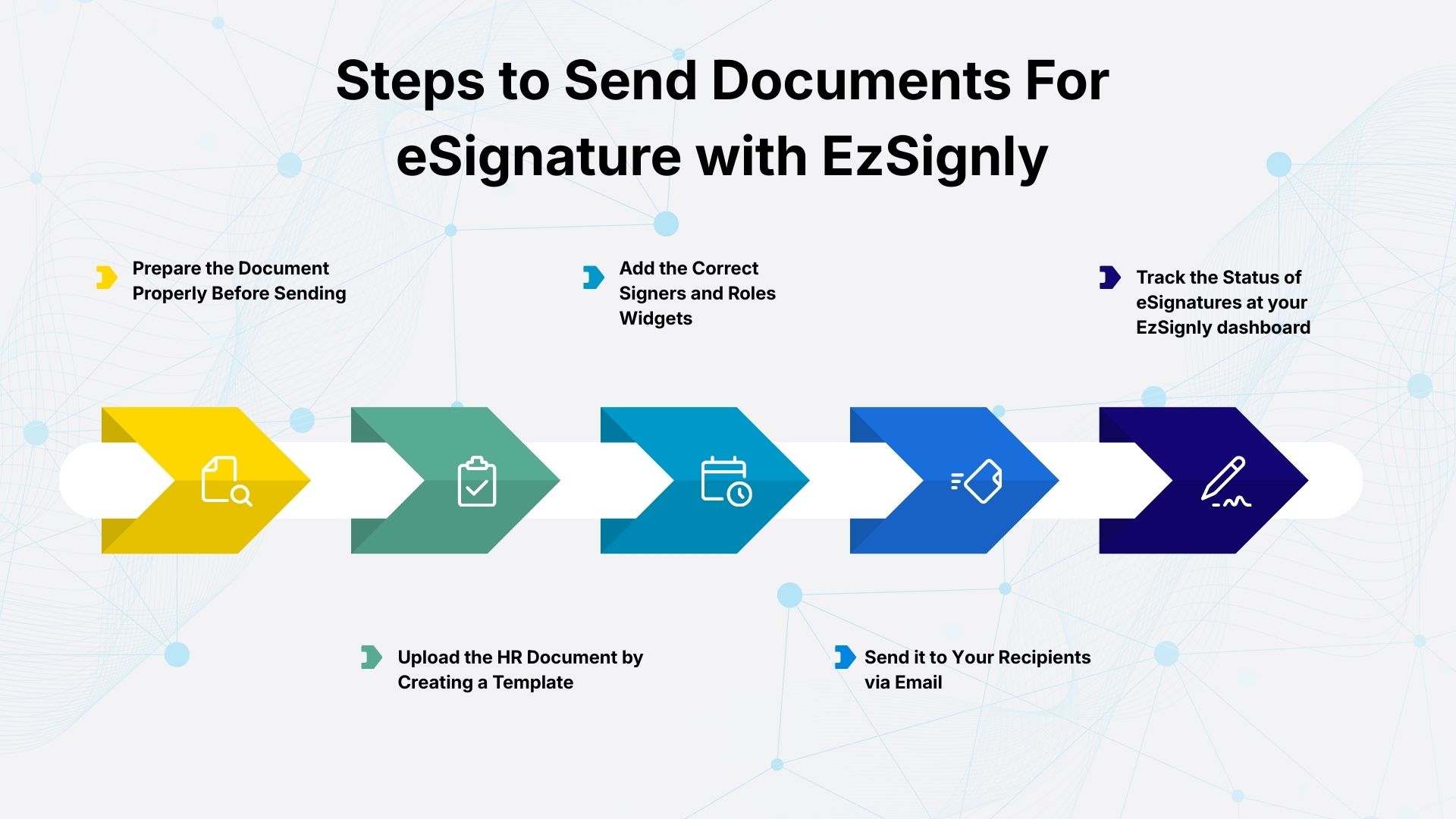
Step 1: Prepare the Document Properly Before Sending
Before HR sends anything for signature, the most important step is ensuring the document is final. Many signing delays happen because the document is incomplete, outdated, or still under review. That creates confusion and avoidable back-and-forth.
A good HR document should include the correct company
legal entity, role title, salary details, joining date, and the correct terms
and clauses. It should also be formatted cleanly, ideally as a PDF. Once the
document is finalized, sending it for signature becomes a smooth process.
Step 2: Upload the HR Document
After preparation, the HR team uploads the document into our platform by selecting “Create Template”.
Now, instead of printing and scanning, the document is ready for signing instantly.
In high-volume HR workflows, this single step saves
hours every week. It also eliminates common errors like missing pages, poor
scan quality, and unreadable signatures.
Step 3: Add the Correct Signers and Roles
The document signatory is predominantly the applicant
and/or employee. However, in a lot of organisations, the hiring manager may
also have to sign. Some organisations will have a legal reviewer for certain
types of roles or contracts also. With our online signature software for HR,
you will be able to assign signatories correctly to avoid any ambiguity
regarding who signs what. In addition, this tool is especially useful when HR
needs to designate a signing order.
Step 4: Add Signature and Form Fields
One of the biggest advantages of modern HR signing is the ability to place fields inside the document. This reduces mistakes and increases completion rates.
HR teams can also add date fields, name fields,
initials, and checkboxes. This small change improves compliance and makes the
record stronger if HR ever needs proof later.
Step 5: Write a Clear, Human Signing Message
The email message matters more than most HR teams realize.
A confusing signing email can lead to delays because
the candidate ignores it, misunderstands it, or assumes it is not urgent. Our
tool also gives you AI assistance in drafting emails to go with your
document.
Step 6: Enable Automated Reminders
One of the most exhausting parts of HR work is chasing signatures. Managers end up sending reminder emails manually, which wastes time and creates friction.
Our eSignature tool allows HR teams to enable
automated reminders. The system sends follow-ups automatically when a signature
is pending. This improves completion rates without HR needing to intervene.
Step 7: Track Progress in Real Time
Before the use of esignature software, the workflow was manual and costly when trying to track applicant status. Most HR departments would first look through their email threads, then ask the candidates if they had signed, and follow up again. By implementing our online signature software for HR department, now they have access to real-time tracking of document status at any point in time. This means that teams can see when a document has been opened and if it has been signed as well as who has signed and who hasn't.
This is extremely beneficial when determining the
timeline for completing onboarding steps such as IT access, payroll setup and
other formalities for new joiners.
Step 8: Store Signed HR Records in a Clean, Secure Way
Once a document is signed, the next challenge is recordkeeping.
Many HR teams still store signed documents across inboxes, shared drives, and random folders. That makes retrieval difficult during audits or disputes.
Our eSignature platform lets you keep signed documents
stored securely and consistently. Each completed document includes proof such
as timestamps, signer logs, and an audit trail.
Step 9: Turn Recurring HR Documents Into Templates
Offer letters, NDAs, contractor agreements, and policy
forms are sent again and again. Manually preparing these documents each time
creates unnecessary workload and increases the chance of errors. The best
esignature software for HR allows teams to convert frequently used
documents into templates. This means HR can send a document in minutes, with
consistent formatting and fields already placed.
Step 10: Use Bulk Sending for High-Volume HR Workflows
In 2026, many HR teams handle bulk signing workflows that include annual policy acknowledgements, training completion forms, contractor renewals, and large onboarding cycles.
Bulk sending allows HR to send the same document to
many recipients without repeating the same steps manually.
Best Esignature Solution
What Illinois HR Teams Should Know About Legal Validity
For most business HR documents, eSignatures are
legally recognized when the process captures clear intent, consent, and record
retention. It is also why businesses sometimes choose a platform that supports
not only HR documents, but also workflows like a Digital esign legal doc in
illinois where stronger proof, audit trails, and secure records become even
more important. This is why using a professional platform for free document
signing matters.
How HR Teams Evaluate Pricing in 2026
Cost matters, but the smartest HR teams evaluate cost differently now.
Instead of asking, “What is the cheapest plan?”, they ask, “What saves us time and reduces risk?” This is why esignature Software Pricing in Illinois is increasingly evaluated based on the ROI it gives. HR teams look for features that reduce workload,
such as templates, bulk sending, reminders, and secure
record storage. In many cases, the ROI becomes obvious within weeks, because HR
spends less time on paperwork and more time on people.
Why eSignatures Help the Business Beyond HR
Once leadership sees how much faster HR workflows become, the same platform is often used for sales contracts, vendor agreements, service agreements, and internal approvals.
Therefore, companies increasingly adopt Esignature
for their business in Illinois as part of their broader execution stack. It
is convenient, affordable and makes execution of documents easier across all
departments.
Conclusion
HR teams already manage the most complex part of business: people.
They should not be slowed down by printing, scanning, and chasing signatures.
In 2026, the best HR workflows are fast, secure, and consistent.
Digital signing helps HR teams onboard employees
faster, improve compliance readiness, and keep records clean. Our online
signature software for HR in the USA makes it easy to send documents for
eSignature, track completion, and build repeatable workflows that scale with
your team. If you want a smoother onboarding process with less follow-up and
better records, open a free account and get started today.
FAQs:
1. Is it legally valid to eSign HR documents in Illinois?
Yes. Most HR documents can be signed electronically in Illinois as long as the process captures clear intent, consent, and provides proper record retention such as audit trails and completed copies.
2. What HR documents can be sent using online eSignature platforms?
HR teams commonly send offer letters, employment agreements, NDAs, contractor agreements, handbook acknowledgements, and policy acceptance forms through HR online signature software in Illinois.
3. How do HR teams evaluate esignature software pricing plans?
In 2026, HR teams evaluate pricing based on value- features like templates, automated reminders, audit trails, bulk sending, and secure storage- rather than choosing the lowest-cost plan.
Take a look at the latest blog
AI-Powered eSignature Security for SMBs: Setup to Full Protection (USA & India)
Protect your business documents with AI-powered eSignature security. Fast setup, fraud detection, and full protection for SMBs in the USA & India.
April 17, 2026
"How to Choose the Right E-Sign Tool in Illinois for True Traceability: Every Entry Leaves a Trail "
Select an Illinois e-sign technology that offers clear, verifiable records for each action and safe audit trails.
September 22, 2026
The Role of eSignature Software in Digital Business Transformation: Here's a Better Way
eSignature software simplifies digital transformation with secure, fast, and paperless document signing.
July 10, 2026
A Complete Guide to Choosing the Right eSignature Software in 2026
A quick guide to choosing the right eSignature software in 2026 based on features, security, pricing, and compliance.
February 17, 2026
Have any other questions? EzSignly's team is here to help!
© 2026 Copyright EzSignly. All Rights Reserved