


Top 10 eSignature Tools for U.S. Businesses in 2026
March 10, 2026 | Posted By Admin
Best E-signature Tool
Summary
As businesses move toward faster, fully digital
workflows, choosing the right eSignature platform has become critical. This
guide explores the top 10 eSignature tools for U.S. businesses in 2026,
comparing their features, strengths, and ideal use cases to help you select the
solution that best fits your workflow, compliance needs, and growth plans.
Introduction:
What does a ‘handshake deal’ mean in 2026? It does not mean the same as it meant before. In the United States, the move from paper to pixel is the price of staying competitive in the modern world.
Whether you are a B2B SaaS founder in San Francisco or an HR director looking for the best eSignature software for HR in Illinois, clicking “I agree” is just the tip of the iceberg. The real challenge lies in ensuring that your digital signatures are legally valid, compliant with U.S. regulations, and efficient enough to keep business moving at speed.
The U.S. digital signature market is projected to
surpass $24 billion by 2033, growing at an annual rate of over 40%.
Organizations that delay adopting robust E-signature online platforms
risk not only operational inefficiencies but also potential compliance issues
under the ESIGN Act and UETA. Below is a deeper look at the top 10 eSignature tools
for U.S. businesses in 2026, starting with a platform designed specifically for
fast-moving SaaS teams.
Best Electronic Document Signing
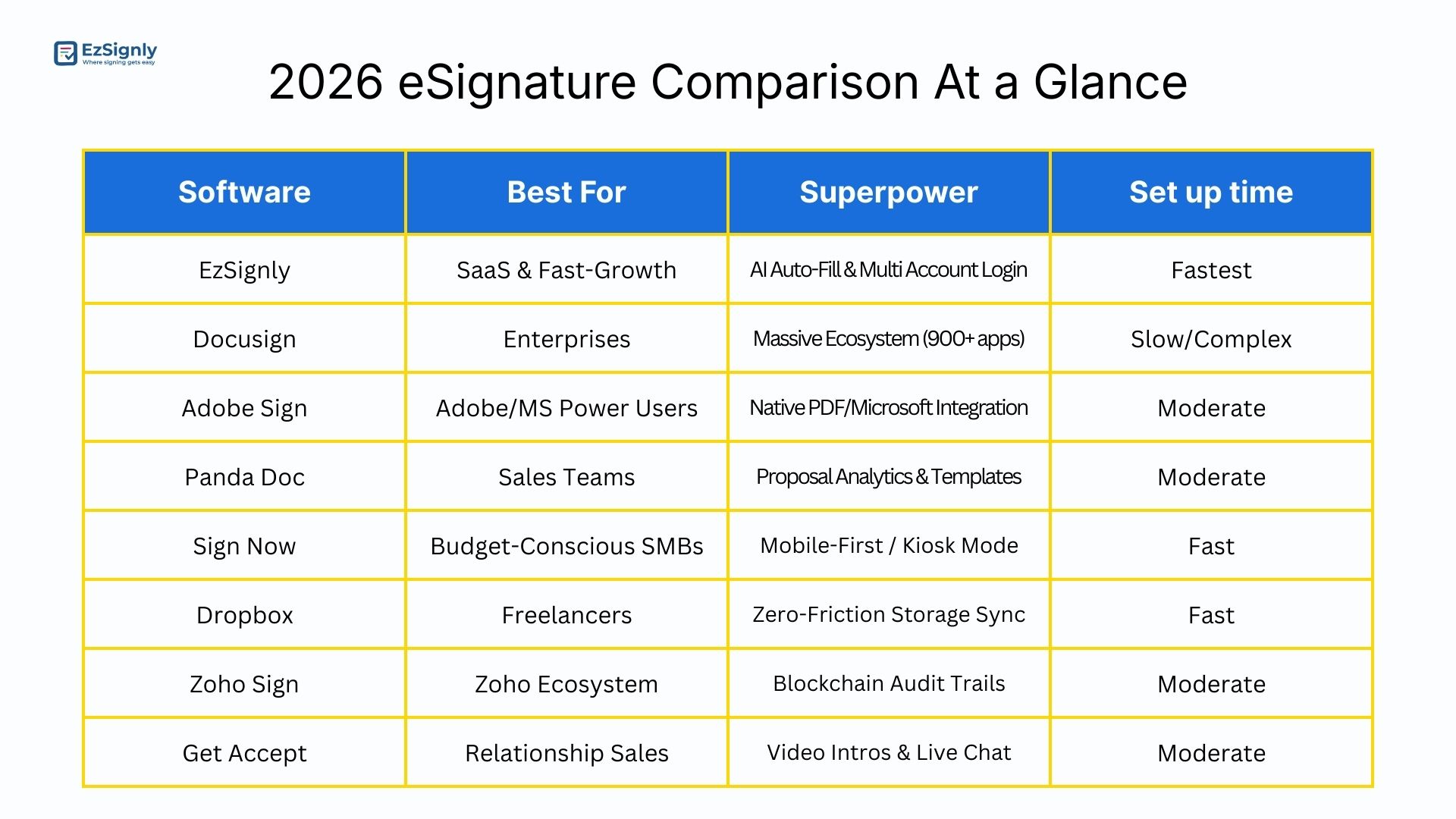
1. DocuSign: The Industry Veteran
DocuSign remains one of the most widely recognized eSignature solutions in the United States. Over the years, it has expanded beyond simple signatures to offer Intelligent Agreement Management (IAM).
Its strongest advantage is its massive integration ecosystem, supporting over 900 integrations with popular tools like Salesforce, Microsoft Dynamics, and SAP. However, businesses evaluating eSignature software price in Illinois should note that DocuSign is widely considered one of the more premium options, envelope limits and support costs can increase quickly as usage grows, making it a less ideal fit for teams seeking a more affordable electronic signature software.
Key features include:
- Advanced identity verification with Liveness Detection
- AI-powered contract analysis
- Document lifecycle management
- Automated approval workflows
- Enterprise-grade compliance for regulated industries
Additionally, it offers in-depth analytics that enable organizations to track the level of engagement with the document and the level of completion.
Best For: Large
organizations with complex approval chains and international compliance
requirements.
2. Adobe Acrobat Sign: The PDF Powerhouse
Adobe Acrobat Sign is a natural extension of the Adobe ecosystem and integrates seamlessly with Adobe Acrobat, Creative Cloud, and Microsoft 365. For teams that regularly need to sign PDF online for free or sign a Word document online, Adobe’s platform provides a familiar and powerful environment.
The standout feature of this tool is its Liquid Mode, which rearranges large PDF files in mobile-friendly layouts to facilitate reading and signing of such files on mobile phones.
Other notable features are:
- Seamless PDF editing and signing
- Automated workflow routing
- Cloud document storage
- Integration with SharePoint and Teams
- Enterprise-level authentication options
Adobe’s greatest strength is in their ability to manage documents, making it a great fit for teams already using many Adobe products. Some users, however, find that the pace of innovation in AI-powered automation tools is slower than in newer SaaS-focused tools.
Best For:
Legal teams, design firms, and any organization already heavily integrated in
the Adobe ecosystem.
3. PandaDoc: The Sales Accelerator
PandaDoc considers itself not only an eSignature solution but a complete proposal management solution, built specifically for revenue teams.
Its most important feature is the ability to combine quotes, contracts, and payments into a single document workflow.
Its capabilities are:
- Beautiful proposal templates
- Real-time engagement tracking
- Embedded payment collection
- Custom branding and document design
- CPQ (Configure, Price, Quote) functionality
Sales teams especially like the analytics feature in PandaDoc, which sends notifications when the document has been viewed or when the price section has been reviewed. However, for simple internal processes such as HR and vendor management, PandaDoc can be overkill.
Best For:
Sales-driven companies looking to streamline proposals and contract management.
4. SignNow: The ROI Champion
SignNow, part of the airSlate ecosystem, focuses on delivering enterprise features at a more accessible price point, making it a compelling option for businesses comparing E-signature software prices in Illinois and looking for strong returns without overspending. It offers strong automation tools combined with an intuitive interface.
Key features include:
- Document templates and reusable fields
- Bulk sending capabilities
- Automated workflows
- Advanced mobile signing experience
- In-person signing with Kiosk Mode
Kiosk Mode allows businesses to collect signatures directly on tablets or kiosks, making it particularly useful at events or retail environments. While SignNow offers excellent value, it lacks some of the AI-driven document insights that newer platforms provide.
Best For:
Mid-sized companies looking for strong features without enterprise pricing.
5. Dropbox Sign: The Minimalist’s Choice
Formerly known as HelloSign, Dropbox Sign prides itself on its simplicity and ease of use. For startups and solo operators seeking a reliable free DocuSign alternative or the best eSignature software for small businesses, Dropbox Sign provides a clean and easy-to-use experience.
Dropbox Sign integrates seamlessly with Dropbox, enabling signed documents to be stored in a designated area.
Key features:
- Simple drag-and-drop signature fields
- Team management tools
- Audit trails and compliance logs
- API access for developers
- Google Workspace integration
Dropbox Sign is very easy to use because of its simple interface and workflow process. However, it does not have in-depth compliance tools for industries like healthcare and finance.
Best For:
Suitable for freelancers and small businesses with basic signing needs.
6. EzSignly: The AI-Powered Solution
EzSignly has quickly become a favorite among modern U.S. businesses that prioritize speed and automation. Instead of functioning merely as a digital signature tool, the platform focuses on accelerating document workflows, and it stands out as one of the platforms offering the Best eSignature features in Illinois and beyond. One of the notable features of EzSignly is its One Click AI Filling feature, which analyzes the documents and creates email subjects and messages, as well as classifying the documents. This speeds up the time taken in preparing the documents before they are dispatched.
For large conglomerates, EzSignly is introducing a new Multi-company accounts login, letting you control your document transactions across companies from one Master Account. This makes it ideal for SaaS companies embedding signature capabilities directly into their products.
Additional features include:
- Automated sequential signing workflows
- Role-based access controls
- Secure audit trails and document history
- Bulk sending and automated reminders
- Real-time document tracking dashboards
From a compliance standpoint, EzSignly provides ESIGN, UETA, SOC 2, and 21 CFR Part 11 compliance as part of its base product and does not reserve this functionality for its enterprise plans.
Best For:
B2B SaaS companies, agencies, and high-volume sales teams.
7. Zoho Sign: The Ecosystem Play
Zoho Sign is most effective when used in conjunction with other Zoho tools. If your business is already using Zoho CRM, Zoho Books, or Zoho Projects, you can expect a smoother document signing process.
Some notable features include:
- Blockchain-based timestamping
- Automated approval workflows
- Custom document templates
- Mobile signing capabilities
- Integration with Zoho apps and third-party tools
Zoho Sign also supports strong compliance frameworks such as eIDAS and ESIGN, making it suitable for global businesses. Its interface, however, can feel less modern compared to newer SaaS platforms.
Best For:
Businesses already running operations within Zoho’s software suite.
8. Nitro Sign: The Secure Challenger
Nitro Sign has carved a niche as a security-centric alternative to DocuSign and other more popular tools. It is an excellent choice for teams looking for the best electronic signature tools at an affordable price.
The company focuses on providing predictable pricing and robust data protection.
The basic features are as follows:
- Secure Sharing
- Tamper Proof Audit Trail
- Integration with Nitro PDF Tools
- Bulk Sending and Tracking
- Enterprise Grade Security Features
The biggest advantage of Nitro is its transparency.
Unlike other competitors in the field, Nitro does not charge extra for overages
and has simple pricing plans. However, the integration library is limited when
compared to the best competitors.
9. SignWell: The Productivity Specialist
SignWell focuses heavily on improving the signing experience itself. Its tools are designed to reduce the time documents spend waiting in inboxes, making it one of the more practical choices for teams that simply want to sign documents online quickly and efficiently.
Key features include:
- Automated reminders
- Document expiration deadlines
- Real-time document status tracking
- Templates for recurring agreements
- User-friendly signer interface
The platform’s intelligent reminders adjust based on signer behavior, increasing the likelihood that documents get signed quickly. However, SignWell lacks some advanced workflow automation features needed by larger organizations.
Best For:
Small teams needing quick, simple document turnaround.
10. GetAccept: The Relationship Builder
GetAccept treats contracts as an extension of the sales conversation. Instead of sending static documents, businesses can include interactive content to engage clients during the signing process.
Unique features include:
- Embedded video introductions
- Live chat within documents
- Document engagement analytics
- Sales automation integrations
- CRM integrations with Salesforce and HubSpot
These capabilities allow sales teams to walk clients through agreements and address questions immediately. However, the platform is specialized for high-touch sales environments and may be excessive for simple internal documentation.
Best For:
B2B sales teams and consulting firms focused on relationship-driven deals.
Which eSignature Tool Should You Choose?
The eSignature tool of choice will depend on your business type and size, as well as your business processes and regulatory requirements.
Fast-Growing SaaS Teams:
For businesses where speed and automation are top priorities, tools such as EzSignly are built for high-speed business workflows with AI-powered document preparation and rapid API access.
Large Enterprises:
For businesses that need to manage global agreements, DocuSign is a top choice for their wide range of integrations and agreement management tools.
Adobe or Zoho Ecosystem Users:
Businesses already using these platforms may find Adobe Acrobat Sign or Zoho Sign convenient due to seamless integrations with existing tools.
Mid-Sized Businesses:
SignNow and Nitro Sign are examples of tools with great functionality and security without the need for expensive enterprise plans.
Startups and Small Businesses:
Dropbox Sign and SignWell are examples of tools with
great functionality and affordability for small businesses with less complex
document requirements. Whether you need to sign a Word document online for free
or need to sign a PDF online for free, they are great tools with real value for
small businesses and startups.
Have any other questions? EzSignly's team is here to help!
Final Thoughts
As the digital economy expands, eSignature platforms
are evolving from simple signing tools into complete agreement management
systems. Across the country, and especially for Businesses searching for the
best eSignature software online in Illinois, the market has never
offered more choice, flexibility, or value. Choosing the right solution depends on your
priorities: speed, integrations, compliance, or cost. For startups and
fast-growing SaaS companies, modern platforms like EzSignly emphasize workflow
automation and speed. Larger enterprises may lean toward legacy solutions with
extensive integration libraries.
FAQs
Q1: What is the best eSignature software for HR teams in Illinois?
Ans: For HR teams in Illinois, the ideal eSignature software should handle high document volumes, automate onboarding workflows, and meet ESIGN and UETA compliance standards. EzSignly is a top contender thanks to its AI-powered document preparation, role-based access controls, and bulk sending features.
Q2: How much does eSignature software cost for Illinois businesses in 2026?
Ans: Entry-level plans from tools like Dropbox Sign or SignWell can start as low as $8–$15 per user per month, making them practical choices as a free DocuSign alternative for small businesses. Mid-tier platforms like SignNow and EzSignly offer competitive pricing with enterprise-grade features.
Q3: Are digital signatures legally valid in Illinois?
Ans: Yes, digital signatures are fully legally valid in Illinois. The state follows the UETA Act, and all transactions are also governed by the federal ESIGN Act, which gives electronic signatures the same legal standing as handwritten ones.
Take a look at the latest blog
From Manual to Instant: AI eSignatures That Accelerate Business Operations
Replace manual signing with AI eSignatures to speed up approvals and streamline operations.
April 13, 2026
Pro & Cons of eSignature Software With Automation in HR Onboarding: Book A Demo
Use eSignature software to automate HR onboarding. Examine the benefits and drawbacks and schedule a demo right now.
July 21, 2026
No More Document Chaos: Smarter eSign Solutions for Faster Workflows — Book a Demo
Eliminate document chaos with smarter eSign solutions designed for faster, seamless workflows. Book a demo and see automation in action.
June 3, 2026
Productive Contract Management Tools to diminish Compliance Risks and Delays for Small Businesses
Streamline contracts with productive contract management tools that reduce compliance risks, delays, and manual errors for small businesses.
June 4, 2026
Have any other questions? EzSignly's team is here to help!
© 2026 Copyright EzSignly. All Rights Reserved